
Vendor/Sponsor/Owner: Tutored By Teachers
Contact: Rafik Robeal (CTO) - rafik@tutored.live
If You Are Already a Tutored by Teacher Customer
1. Add the TbT Integration
In the MiDataHub Management Portal, add the Tutored by Teachers (TbT) integration. This will generate the credentials required for the connection.
2. Allow Vendor Access to Credentials
When creating the integration, ensure “Allow Viewing of Credentials in Management Portal” is checked. This allows the Tutored by Teachers team to securely retrieve the credentials from the Vendor Management Portal.
3. Vendor Configuration
The Tutored by Teachers team will use the credentials retrieved from the Vendor Management Portal to configure the connection in their tutoring platform’s admin settings.
4. Data Synchronization
Once the integration is configured, tutoring session data will automatically synchronize with MiDataHub on a weekly basis.
If You Are Not a Tutored by Teacher Customer
Please complete the Tutored by Teachers contact form:
https://tutored.live/contact-us-3/
A member of their team will follow up with next steps.
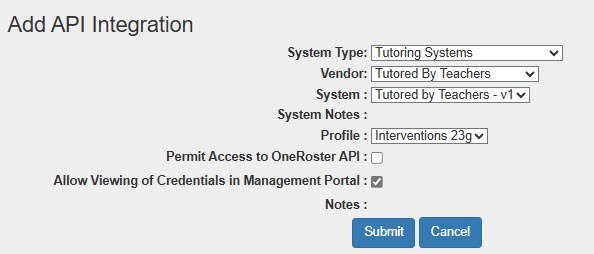
Integration Steps (Under the API integration section):
Select the following choices:
- System Type: Tutoring Systems
- Vendor: Tutored by Teachers
- System: Tutored by Teachers - v1
- Profile: Interventions 23g
- Allow Viewing of Credentials in Management Portal: Must be check so vendor can see your credentials for accessing data.
- Click the Submit button.
Validation
After the integration is configured, confirm that data is flowing correctly by:
- Monitoring integration logs, or
- Reviewing sample records in MiDataHub.
Implementation Notes
Tutoring session data is synchronized weekly.